How to Track Traffic Coming from ChatGPT
 By Irene Chan · · 8 min read

As a SaaS founder, you're likely curious about how much traffic your website receives from AI tools like ChatGPT. These platforms are increasingly the first stop for users seeking product recommendations.
In this guide, I'll walk you through practical methods for tracking ChatGPT referrals, analyzing the data, and using these insights to strengthen your growth strategy.
Why Track Traffic Coming from ChatGPT?
AI platforms like ChatGPT increasingly influence how users discover and choose SaaS products, yet most companies don't track this traffic source. This creates both a challenge and an opportunity for forward-thinking founders. Understanding where your visitors come from—including AI referrals—provides valuable insights that can shape your marketing strategy.
The LLM Revolution is Changing User Behavior
More people use Large Language Models (LLMs) like ChatGPT to find product recommendations instead of traditional search engines. This shift represents a fundamental change in discovery patterns that every SaaS founder needs to understand and adapt to.
If you've noticed your website traffic declining despite strong impressions in Google Search Console, this could be the culprit: users are getting answers directly from AI tools instead of clicking through to your site.
👉 Read more: The Real Reason Why Organic Search Traffic is Declining
ChatGPT is Now a User Acquisition Channel
Just as you optimize for Google or social media, ChatGPT has become another essential acquisition channel. Without proper tracking, you're flying blind in what's quickly becoming a major source of qualified leads.
We recently discovered that one of our SaaS clients generated over 700 new trials in one month!
How to Track Traffic Coming from ChatGPT
If you’ve been using GA4 to track your analysis, you’re already one step ahead. You most likely already have data from ChatGPT. You just need to dig deeper.
Here’s how to do that.
- Log in to Google Analytics.
- Go to Business Objectives.
- Under General Leads, go to Traffic Acquisition.
- You’ll see the top-level source types: direct, organic search, organic social, and referrals.
Now, you’ll need to add another layer to that data so you can see traffic from ChatGPT. In the upper-left corner, click the + sign and select Session Source/Medium. The data will expand and show you the websites that brought in traffic, including ChatGPT.
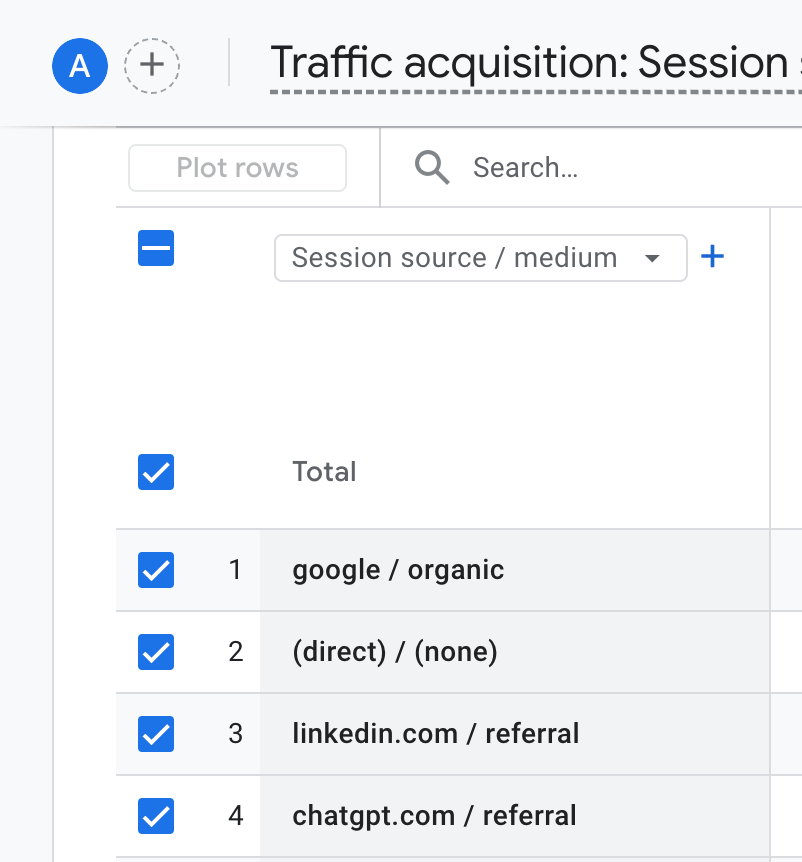
You don’t need to do anything special for your tracking. If you have Google Analytics installed correctly on your site, you will already see this data.
ChatGPT traffic typically appears with referrers like:
- chat.openai.com
- chatgpt.com
- Various OpenAI domains
However, this method only captures clicks from links shown directly in ChatGPT interfaces—not all AI-generated visits will show these referrers.
How to Optimize Your Site for ChatGPT Visibility
Once you've set up tracking, the next logical step is to increase your visibility in ChatGPT responses. Here's a step-by-step approach based on what we've found effective:
Step 1: Set Up Bing Webmaster Tools
ChatGPT pulls current web content through Microsoft Bing when browsing, making Bing visibility crucial:
- Go to Bing Webmaster Tools
- Add and verify your website
- Submit your sitemap
- Monitor your performance metrics regularly
This step is essential because OpenAI has confirmed they source web data through Bing's API. By ensuring Bing indexes your site properly, you increase the chances of ChatGPT finding your content when answering user queries.
Step 2: Implement Comprehensive Schema Markup
Schema helps AI systems better understand your content's context and purpose:
- Add Organization schema to clarify your company details
- Implement Product schema for your SaaS offerings
- Use Article schema for blog content
- Ensure proper HowTo schema for any guides or tutorials
Why this matters: Schema markup provides AI systems with structured data that clearly identifies what your content is about. This creates machine-readable context that helps ChatGPT "understand" your content more accurately when determining relevance to user queries.
Step 3: Add FAQ Schema to Blog Posts
We've been testing this extensively with our clients, and FAQ schema has shown significant impact on ChatGPT visibility:
- Create a comprehensive FAQ section at the end of each blog post.
- Implement FAQ schema for these questions and answers.
- Focus on questions users are likely to ask ChatGPT.
- Keep answers concise but informative.
Example FAQ schema implementation:
<script type="application/ld+json">
{
  "@context": "https://schema.org",
  "@type": "FAQPage",
  "mainEntity": [{
    "@type": "Question",
    "name": "How can I track traffic from ChatGPT?",
    "acceptedAnswer": {
      "@type": "Answer",
      "text": "Track ChatGPT traffic by monitoring referrals from OpenAI domains in GA4, using UTM parameters on content that might be referenced by ChatGPT, and creating dedicated landing pages for AI-referred visitors."
    }
  },
  {
    "@type": "Question",
    "name": "Why isn't my site showing up in ChatGPT responses?",
    "acceptedAnswer": {
      "@type": "Answer",
      "text": "Your site may not appear in ChatGPT responses if it's not properly indexed by Bing, lacks structured data, doesn't have clear FAQ content, or doesn't directly address the specific questions users are asking."
    }
  }]
}
</script>
I didn't implement the actual code. We have an amazing WordPress and SEO specialist who implements this schema every time he publishes a new blog post. We've now added this to our recurring blog post process after testing.
💡Important: Add the FAQ schema individually to each blog post rather than using a site-wide implementation. This ensures the questions and answers are contextually relevant to the specific content.
👉Read more: How to Use ChatGPT to Generate Comprehensive FAQs
Here's how you can check if you implemented the schema correctly:
- Go to https://search.google.com/test/rich-results.
- Type in the blog post link.
- Check if the FAQ structured data is detected:

As you can see, there are more schemas. But that is a discussion for another time!
Step 4: Monitor and Iterate
After implementing these optimizations, we started seeing traffic from ChatGPT. The numbers weren't huge initially, but they've grown consistently:
- Track referrals using the methods outlined earlier.
- Identify which content performs best in generating AI referrals
- Analyze the types of questions that drive this traffic
- Create more content that follows similar patterns
While traffic from ChatGPT may start small, the key benefit is the real data you can use to refine your approach. Every website and product is different, so your own data is invaluable for guiding optimization.
The One Thing That We Did to Show Up on ChatGPT
You can make many optimizations for ChatGPT visibility, but we wanted to start with something easy to test. We added FAQ schema and implemented the code in each blog post on March 21, 2025.

Before this date, we received zero traffic from ChatGPT. Our site is fairly new, so this is totally expected.
From March 22 to April 29, 2025, we recorded 6 referrals directly from ChatGPT! I carefully reviewed our analytics. We didn't make any other site changes or run any campaigns that could have affected our ChatGPT visibility during this period.
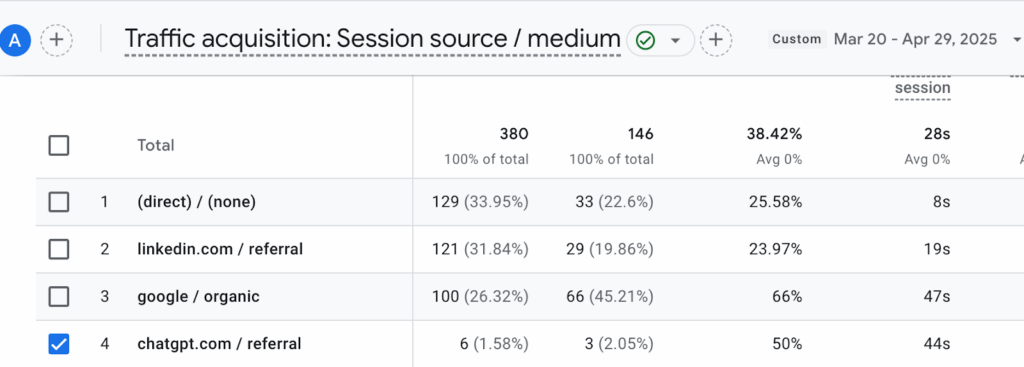
While this requires further investigation, it is reasonable to conclude that adding the FAQ schema directly correlated with traffic from ChatGPT.
The numbers may be small, but going from zero to any measurable traffic is significant, especially if it’s a new site. More importantly, it gives us concrete data to work with as we continue optimizing. Test this approach on your own site and see how it affects your ChatGPT traffic. Even modest gains provide valuable insights for your broader AI visibility strategy.
Note that as of October 2026, some experts say schemas no longer need to be implemented, as AI crawlers and Google Search are more sophisticated at crawling sites for AI platforms. But as I always say, it's better to implement them to increase your chances of being found. It's also an easy task to do.
Connecting ChatGPT Traffic to Your Broader Growth Strategy
ChatGPT traffic shouldn't exist in isolation—it should be integrated into your overall marketing strategy. Here's how to integrate it effectively:
- Cross-channel attribution: Understand how AI-referred visitors interact with your other marketing touchpoints
- Content repurposing: Use insights from successful ChatGPT-optimized content to improve traditional SEO content
- Feedback loops: Analyze questions users ask ChatGPT about your product to inform product development
- Competitive monitoring: Track how often competitors are mentioned alongside your product in AI contexts
By treating ChatGPT as an integral part of your marketing ecosystem rather than a separate channel, you'll maximize the value of this growing traffic source.
FAQs About Tracking ChatGPT Traffic
Can ChatGPT itself track website traffic?
No, ChatGPT can't directly track traffic to websites. It's a language model, not a web analytics tool. When we talk about "traffic from ChatGPT," we're referring to users who found your site through a recommendation or link provided by ChatGPT, not the AI itself visiting your site. However, nowadays you can connect your analytics tool via MCP. ChatGPT can then pull the data from that tool.
How can I track traffic from ChatGPT using GA4?
After implementing FAQ schema and seeing results, here's exactly how we tracked the traffic in GA4:
- Filter for ChatGPT source: In GA4, go to Reports > Acquisition > Traffic acquisition and create a filter for sources containing "chatgpt.com" or "chat.openai.com"
What if I don't see any traffic from ChatGPT?
If you're not seeing any ChatGPT referrals after implementing tracking:
- Check for blocking: Make sure your robots.txt isn't blocking AI bots that might feed information back to ChatGPT's systems
- Consider user behavior: Your audience might not be asking ChatGPT about your specific product category yet - try asking yourself to see if your site comes up.
- Be patient with schema implementation: We saw zero traffic before adding FAQ schema, and it took just a day to start seeing results - but your timeline might vary
Is optimizing for ChatGPT worth it with such small traffic numbers?
Absolutely! It’s better to work with small data at first compared to no data. If you start seeing numbers, you can control them and keep optimizing. The key is to act, iterate, and keep tracking.
Conclusion: Stay Ahead of the AI Traffic Curve
As AI tools like ChatGPT increasingly influence how users discover and evaluate SaaS products, founders who implement proper tracking and optimization now will gain a significant competitive advantage.
Start simple—set up basic referrer tracking and create a dashboard to monitor trends. Then gradually implement more sophisticated strategies as you gather data about how AI users interact with your business.
The AI landscape is evolving rapidly, so regular monitoring and adjustment are essential to maintain visibility and maximize this growing traffic source. Ready to develop a comprehensive strategy for tracking and optimizing your ChatGPT traffic?
About Irene Chan
Irene Chan is the founder of IreneChan.co. She has spent 15 years in content and SEO, and today leads a team of 23+ remote marketers helping early-stage startups grow through SEO, GEO, and content.
More about Irene →