Why I Moved Away from WordPress and Switched to Vercel
 By Irene Chan · · 10 min read
In October, my website traffic suddenly spiked. At first, I was happy. Then I saw the average time on page: zero.
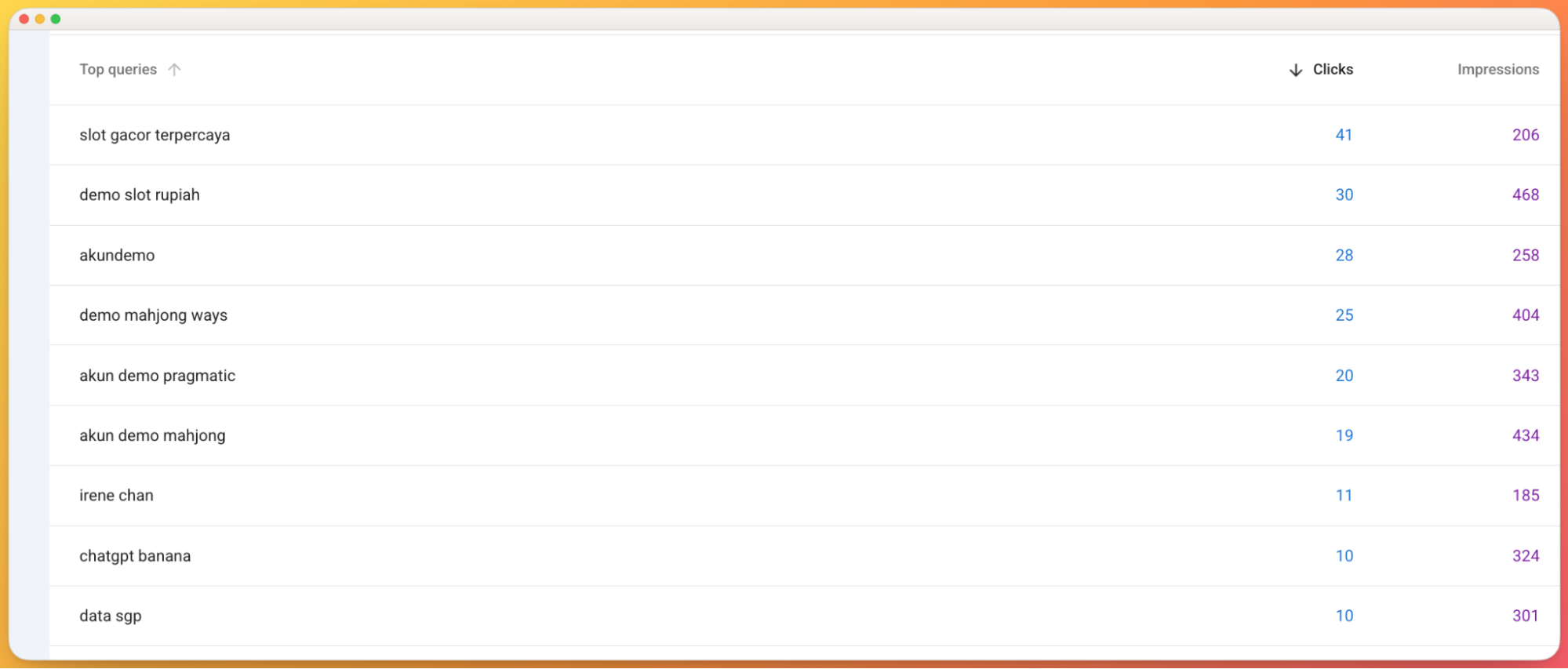
A few clicks into Google Search Console, I found out why. IreneChan.co was showing up for gambling searches. My site had been hacked.
As someone who has been doing SEO for more than 15 years, I've helped clients recover from hacks, broken redirects, and botched migrations. But it hits differently when it's your own site. The one with your name on it.
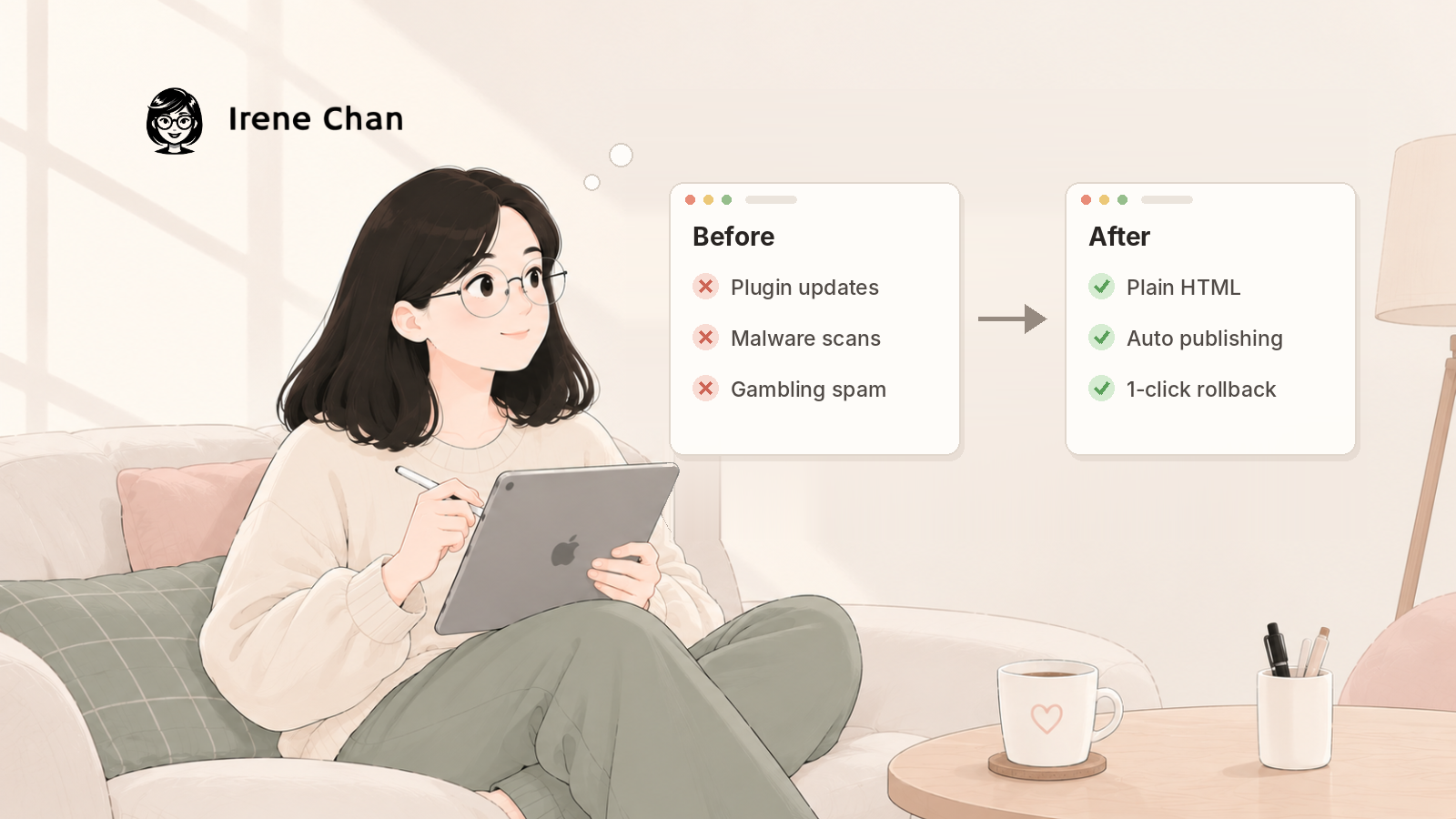
I cleaned it up. Then I made a bigger decision: I moved away from WordPress for good.
Five days later, IreneChan.co runs on Vercel. All blog posts kept their exact URLs, every form still sends leads to my inbox, and no one can break into WordPress anymore.
In this post, I'll share:
- What happened when my site got hacked
- Why I picked Vercel instead of staying on WordPress
- 8 tips if you're thinking of making the switch
- Why so many people are moving away from WordPress right now
Quick note: If you want to migrate from WordPress and you need someone to handle it for you, our team can help with that and more.
Why I Moved Away from WordPress
I’ve been meaning to move to Vercel for a few months now. We’ve already built new sites on Vercel, but it felt more complicated to migrate from WordPress to Vercel. I’ve always liked the team-up between Claude and Vercel.
My site ran on self-hosted WordPress on HostGator since 2024. But I’ve been building WordPress sites for the past 16 years.
Like most WordPress sites, it had a theme, a page builder (Elementor), and a stack of plugins. Each one was another door someone could try to open. All it takes is one outdated plugin.
Let me back up a bit. When the traffic spiked in October 2026, I didn't think much of it. Then I saw the zero. Real readers don't leave the second they arrive.
So I opened Google Search Console. My site was showing up for gambling-related queries, topics I've never written about and would never want my brand tied to.
I'd heard about the PHP hack in the news that same month. In October 2026, PHP released emergency fixes for two critical flaws, later nicknamed PHP2Shell, that could let attackers run code on a website's server without logging in. Since WordPress runs on PHP, millions of WordPress sites were exposed. But I never thought my site would be one of them. It was.
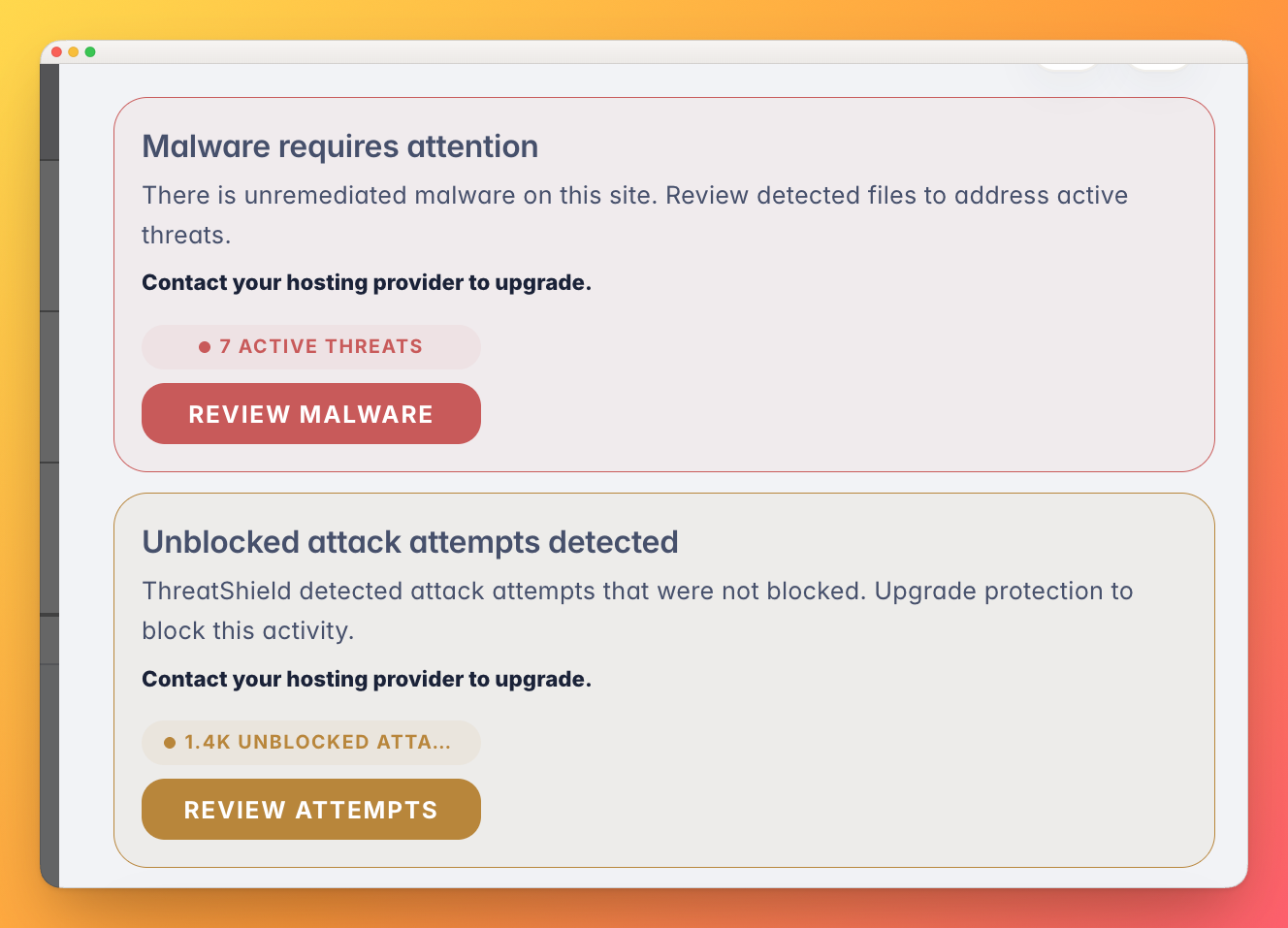
HostGator's malware scanner confirmed it. Malicious code was using my site to promote gambling spam. That's one of the most common WordPress hacks, and one of the worst for SEO. Google can flag your site, and the spam can drag down the trust you built over years.
Luckily, no data was lost. We removed the malware and asked Google to index the site again so those gambling queries would drop out.
5 Reasons Why I Chose Vercel
I looked at a few options, including staying on WordPress with a managed host. In the end, Vercel won for five reasons.
1. It's reliable, and we already trust it
Vercel wasn't new to us. Our Chief Product Officer, Daniel Mayer, and I have already built new sites and projects on Vercel. We knew how it behaved, how fast it deployed, and how little it needed from us once it was running.
That matters when it's your main business site. My leads, my blog, and my service pages all live there. I wanted a host I'd already tested, not another experiment.
One example is PartyPix, a project that runs on Vercel.
2. The free plan is generous for building and testing
Vercel's Hobby plan is free. It includes 100 GB of bandwidth a month, automatic HTTPS, and preview links for testing. That's plenty to build a new site, test it, and show it to your team before you pay anything.
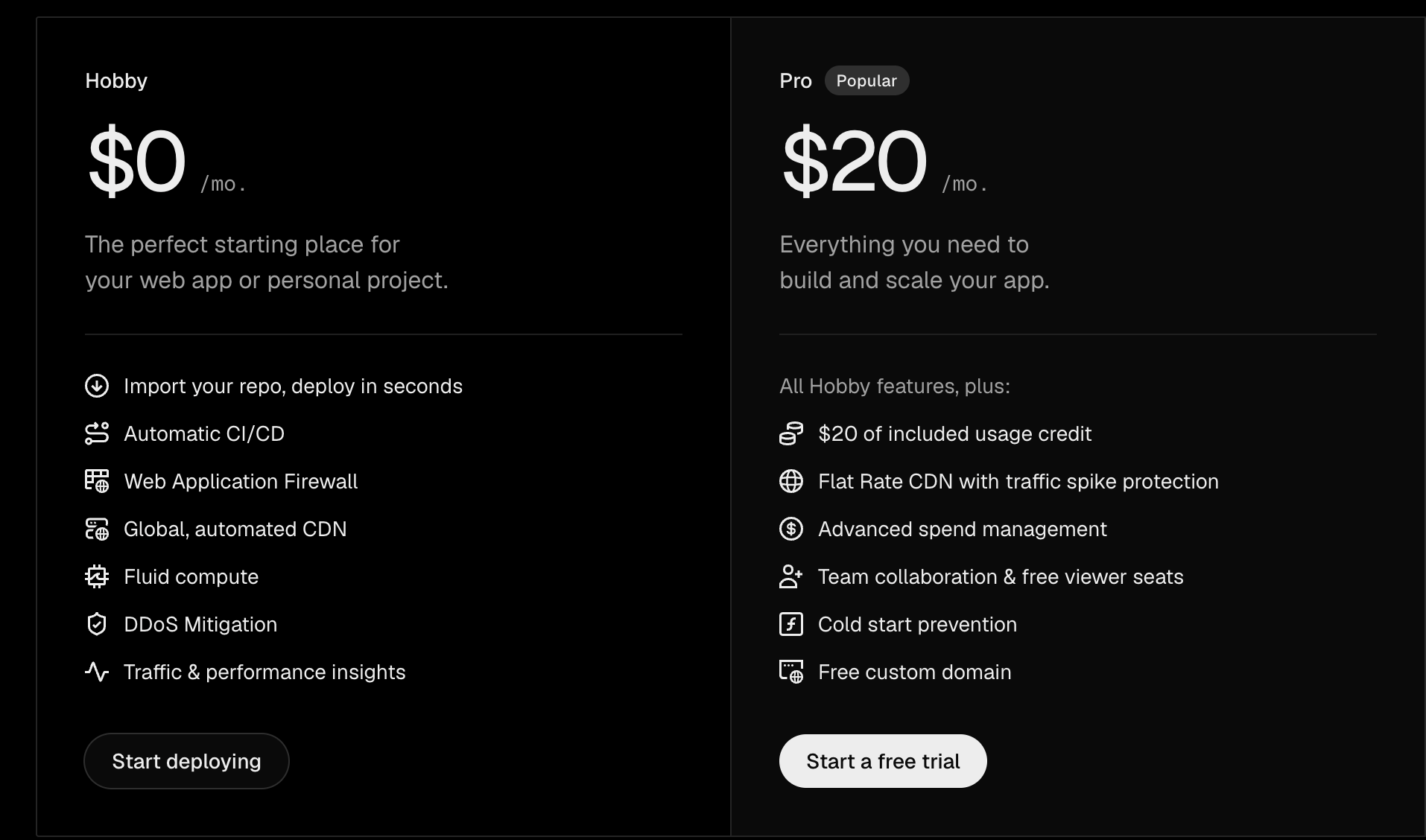
One thing to know: the Hobby plan is for personal, non-commercial projects only. Since IreneChan.co is my business site, I moved to the Pro plan ($20 a month) before connecting my domain. It's still cheaper than many managed WordPress hosts, and I no longer pay for security add-ons.
3. Vercel MCP lets Claude manage the site with me
Vercel has an official MCP server, which lets AI tools like Claude connect to your Vercel account.
During the migration, Claude used it to check that every build worked, read the build logs, add my domain, and confirm my DNS settings were correct. I didn't have to dig through dashboards to see whether something broke.
Now, when I want to change a page, I just ask. Claude edits the site on GitHub, Vercel publishes it, and Claude checks that the live page is right. If you've read my guide on how to use Claude for SEO, this is the same idea, applied to the website itself.
4. It's SEO and GEO friendly
My new site is plain HTML. Every page is fully built before anyone visits it, so there's nothing for a crawler to "figure out."
That's a big deal for GEO. A study by Vercel and MERJ found that major AI crawlers, including ChatGPT's and Claude's, don't render JavaScript. If your content only appears after JavaScript runs, AI search tools may never see it. Static HTML avoids that problem completely.
(If you want to check this on your own site, here's how to know if ChatGPT is crawling your site.)
5. Every version is saved, and rolling back takes one click
On HostGator, I relied on weekly backups. On Vercel, every change is its own saved version, and the site's files live in GitHub with their full history.
If an update ever breaks something, I can go back to the last working version in one click. And if a change has an error, Vercel doesn't publish it. The old version stays live.
Tips When Migrating from WordPress to Vercel
The migration took a few days, not weeks. But I hit a few surprises along the way. Here's what I'd tell anyone doing this.
1. Make sure to create backup copies
Before you change anything, save two backups:
- The WordPress export (Tools → Export → All content). This XML file has all your posts, pages, and their settings.
- A full hosting backup from cPanel. This has everything else: your database, drafts, comments, and old images.
Keep one copy on your computer and one in Google Drive. If your site was hacked, don't restore the backup anywhere. Treat it as an archive you only open to grab something specific.
2. Prioritize security
A static site has no plugins or login page to attack, so the risk moves to your accounts. Whoever gets into those can change your site or take your domain.
- Turn on two-factor authentication for GitHub, Vercel, your domain registrar, and your email.
- Lock your domain at your registrar, so no one can transfer it away.
- Scan your content before importing it. I checked every post and page for leftover spam links from the hack before moving them.
- Delete old WordPress installs once you've downloaded your backup. Forgotten installs are an easy way back in.
3. Keep your URLs, and redirect the rest
Your URLs carry years of rankings and backlinks. Keep every slug exactly the same on the new site. For pages you're removing, set up 301 redirects to the closest page that still exists.
Don't forget the URLs WordPress creates on its own: categories, tags, author pages, feeds, and old slugs from posts you renamed. I added redirects for all of them in one file (vercel.json).
4. Download only the images you use
Compressing my uploads folder on the server kept timing out, because WordPress saves 5 to 10 resized copies of every image. In the end, I only needed 452 files. Claude made a list of the images the new site actually used, and I downloaded those year by year.
5. Replace what only worked inside WordPress
These are the things that break quietly:
- Forms. Contact Form 7 only works inside WordPress. I switched to Web3Forms, which sends submissions straight to my inbox, and kept the same thank-you pages.
- Shortcodes. My posts used custom shortcodes for their call-to-action boxes. Those were defined in my theme's code, so they weren't in the export. Check your theme's
functions.phpfor anything like this. - Page builder layouts. Pages built with Elementor widgets had to be rebuilt. Pages I'd built with custom HTML moved over almost as-is.
- Comments. They don't come over automatically. Decide if you need them.
6. Check where your DNS lives before you cancel hosting
My domain was registered at Namecheap, but HostGator managed my DNS. If I had canceled HostGator first, my email would have stopped working, even though it runs on Google Workspace.
Copy your email records (MX), your verification records (TXT), and any records for tools like MailerLite before you move your DNS. And watch out for default settings at your registrar. Namecheap had "Email Forwarding" switched on, which would have sent my email to the wrong place once it became the live setting.
7. Test everything before you switch
Vercel gives you a preview link before your domain is connected. Use it:
- Open your top pages and a few old URLs to test the redirects
- Submit every form and check that the email arrives
- Check Google Analytics Realtime to confirm tracking works
After the switch, submit your new sitemap in Google Search Console and watch the Pages report for 404s for a few weeks. If you're not sure what to look for, my guide on how to use Claude to do an SEO audit walks through it.
8. Make sure Search Console doesn't lose your site
If a WordPress plugin like Site Kit verified your site in Google Search Console, that verification can disappear with WordPress. Check how your property is verified (Settings → Ownership verification). A DNS record is the safest option because it doesn't depend on your website.
Was It Worth It?
Yes, 100%. My site is faster, simpler, and much harder to hack. I don't worry about plugin updates anymore, and I can change a page by asking Claude instead of fighting with a page builder.
The best part is that nothing was lost. Every post kept its URL, every form still sends me leads, and Google and AI search tools can read every page as plain HTML. At least, that’s how it is for now. I will keep monitoring the site and will report back.
If you're on WordPress and thinking about moving, start with an audit. Knowing which pages bring in traffic tells you what you can't afford to break. Our SEO + GEO audit shows you that, plus where your site is invisible to AI search.
This was my very long story of moving away from WordPress, and I hope you find it useful.
FAQs
Why are people moving away from WordPress?
Mainly because of security issues. Because of the many reported hacks, people are worried that their site is not safe. Plus, Vercel is more lightweight and AI friendly.
Is Vercel free?
Yes, Vercel has a free Hobby plan. It includes 100 GB of bandwidth a month and is meant for personal, non-commercial projects. Business sites need the Pro plan.
Can I use Vercel's free plan for a business website?
No. Vercel's Hobby plan is limited to personal, non-commercial use. If your site promotes a business, sells something, or is built for a client, you need Pro or Enterprise. I used the free plan to build and test, then upgraded to Pro before connecting my domain.
How much does Vercel cost?
Hobby is free. Pro costs $20 per user per month and includes 1 TB of bandwidth and a usage credit. Enterprise pricing is custom. For a content site like mine, Pro is usually all you need.
What is Vercel used for?
Vercel hosts websites and web apps. You connect a GitHub repository, and Vercel builds and publishes your site every time something changes. It's best known as the company behind Next.js, but it also works for simple static sites like mine.
Can you host WordPress on Vercel?
Not the usual way. Vercel doesn't run a traditional WordPress setup with PHP and a database. You can either turn your WordPress site into a static site (what I did) or keep WordPress as a back-end CMS and build the front end on Vercel.
Is Vercel safe?
Vercel includes automatic HTTPS, a firewall, and DDoS protection on every plan. A static site is also much harder to hack than WordPress because there are no plugins, database, or admin login. The biggest risk is your accounts, so turn on two-factor authentication everywhere.
About Irene Chan
Irene Chan is the founder of IreneChan.co. She has spent 15 years in content and SEO, and today leads a team of 23+ remote marketers helping early-stage startups grow through SEO, GEO, and content.
More about Irene →